|
Audio DiffMaker
signal difference extraction software
from Liberty
Instruments
Audio
DiffMaker is completely freeware, doesn't contain advertisements, and
doesn't try to cajole you into "upgrading" to a non-free
version. There are no strings attached. Presented
at the 125th AES convention
"Detecting Changes in Audio Signals by Digital
Differencing" Download
the draft of the AES
paper here (pdf format, 150k).
Download
Slides used for the
technical paper presentation October 3, 2008 at 125th AES Convention,
San Francisco CA. USA. See an Article on Audio DiffMaker v1 in AudioXpress magazine, Jan 2008 |
|
Last Revision: 30 September 2008
-version 3.22-
New in V3:
-
Frequency response compensation
(equalization) of files
-
Improved Sample Rate drift compensation
-
Filesplitting capabilities
|
|

Audio DiffMaker
Install Package, complete with online Help
files (1.8MB).
Click here to
Download
Audio DiffMaker
For new pre-made Dyf files to listen to
with DiffMaker, Downloadable DiffMaker
'Dyf' files
|
|
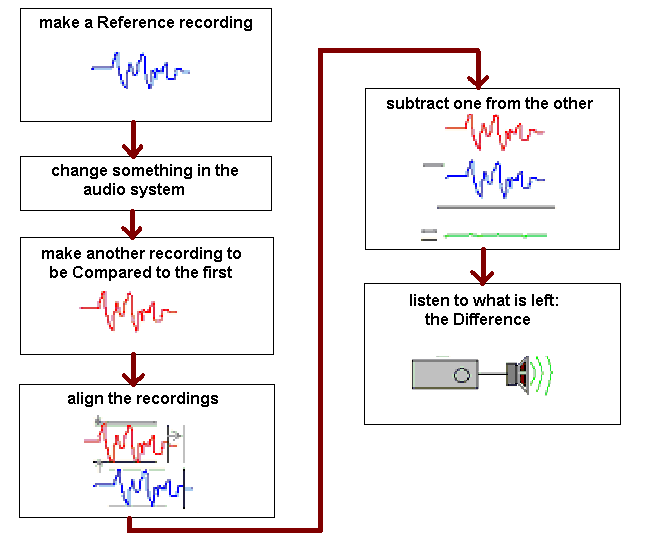
Audio DiffMaker is a
freeware tool set intended to help determine the absolute difference between two audio
recordings, while neglecting differences due to level difference, time
synchronization, or simple linear frequency responses.
The difference recording that results is only what has changed between the two recordings.
If anything - a change of component, a treatment, mechanical damping, etc.
- is having any audible effect on the audio signal in a system, the
difference recording will have audible content. The end result is primarily intended to be evaluated by ear.
This relatively simple idea can be used demonstratet whether some products can alter audio signals in
audio equipment.
Changes detected by Audio DiffMaker are not necessarily audible changes
for any given person. Some changes will not sound different, and
some are too weak to be heard when accompanied by the unchanged part of
the program material. But a silent difference track can only
result if the two tracks being compared are unchanged (the same).
The DiffMaker process, by its very nature, avoids masking effects
because it removes the large signal that masks subtle details. Unlike traditional listening tests, differences can be
detected even when buried by program material or if affected by imperfect
components in the system.
What Can Audio DiffMaker Do?
Some of the tools within Audio DiffMaker can be used to:
- Precisely align two similar audio tracks to the same gain levels and
timing
- Extract and listen to even very tiny differences between pairs of audio
tracks
- Quickly compare two or more recorded audio signals under precisely gain-matched and time-matched conditions.
- Measure the frequency response of the equipment being tested and
apply it so the effects of linear frequency response can be removed
from the testing.
- Record sounds at various sample rates and bit resolutions up to 24bit/192kHz with the "Recorder" tool.
- Select and copy sections of audio tracks, trim them, or "rip" them from audio CDs, with the "Trimmer/Ripper" tool.
- Quickly see the responses of devices or entire audio systems (even
rooms) using the included high resolution 1/6th octave frequency/spectrum "Response Analyzer" and
matched pink noise source.
- Compact multiple WAV files, and a text description, into one easily
transported "DYF" file. Just double-click on a DYF
file in Explorer and Audio DiffMaker will open and
load the files, ready for listening.
|
|
When to use Audio DiffMaker?
Testing for audible effects of
- Changing interconnect cables (compensation for cable capacitance may
be required)
- Different types of basic components (resistors, capacitors,
inductors)
- Special power cords
- Changing loudspeaker cables (cable inductance may need to be matched
or compensated)
- Treatments to audio CDs (pens, demagnetizers, lathes, dampers,
coatings...)
- Vibration control devices
- EMI control devices
- Paints and lacquers used on cables, etc.
- Premium audio connectors
- Devices said to modify electrons or their travel, such as certain
treated "clocks"
- Different kinds of operational amplifiers, transistors, or vacuum
tubes
- Different kinds of CD players
- Changing between power amplifiers
- General audio "tweaks" said to affect audio signals
(rather than to affect the listener directly)
- Anything else where the ability to change an audio signal is
questioned
What will you need to try it?
No $$, the software is free.
The computer used should have 512MB memory minimum and run
at 700MHz or higher. It should ideally have a CDROM drive and about 1GB
minimum spare hard space, and run the Windows 2000, Windows XP, or later
operating system.
Audio DiffMaker can use one or two sound cards and operates in stereo or
monophonic mode. If you only want to listen to files made by others, any
computer soundcard should do.
Doesn't this process require ultra-high end recording
equipment?
No, because DiffMaker doesn't try or need to accurately
reproduce music -- it is only trying to help detect whether anything
has changed, which is a much less demanding
requirement. It doesn't matter if the difference that DiffMaker finds
might not be perfectly reproduced -- only that the difference is left intact
enough to hear.
The sound card used doesn't need to be completely
transparent or of highest pedigree. It only needs to be capable of responding to any differences that may occur (even if those differences
aren't reproduced perfectly) and of not burying any significant differences in
added noise.
How can you tell whether the equipment was good enough in a DiffMaker
result? You can listen to the result, and note the level of any
difference and/or decide if any remaining noise is high enough to be maybe
covering something that may be important. In other words, if the gear
isn't good enough, you'll be able to hear it, it won't make a difference go
silent.
|